

Best Thermostat Settings for Summer AC Savings to Stop the Bill Bleeding
Discover the best thermostat settings for summer AC savings: 78°F home, 82-85°F away. Save 3% per degree + fan tips!
Your Summer Energy Bills Are Too High — Here Is What to Do About It
The best thermostat settings for summer AC savings come down to a few simple numbers recommended by the U.S. Department of Energy:
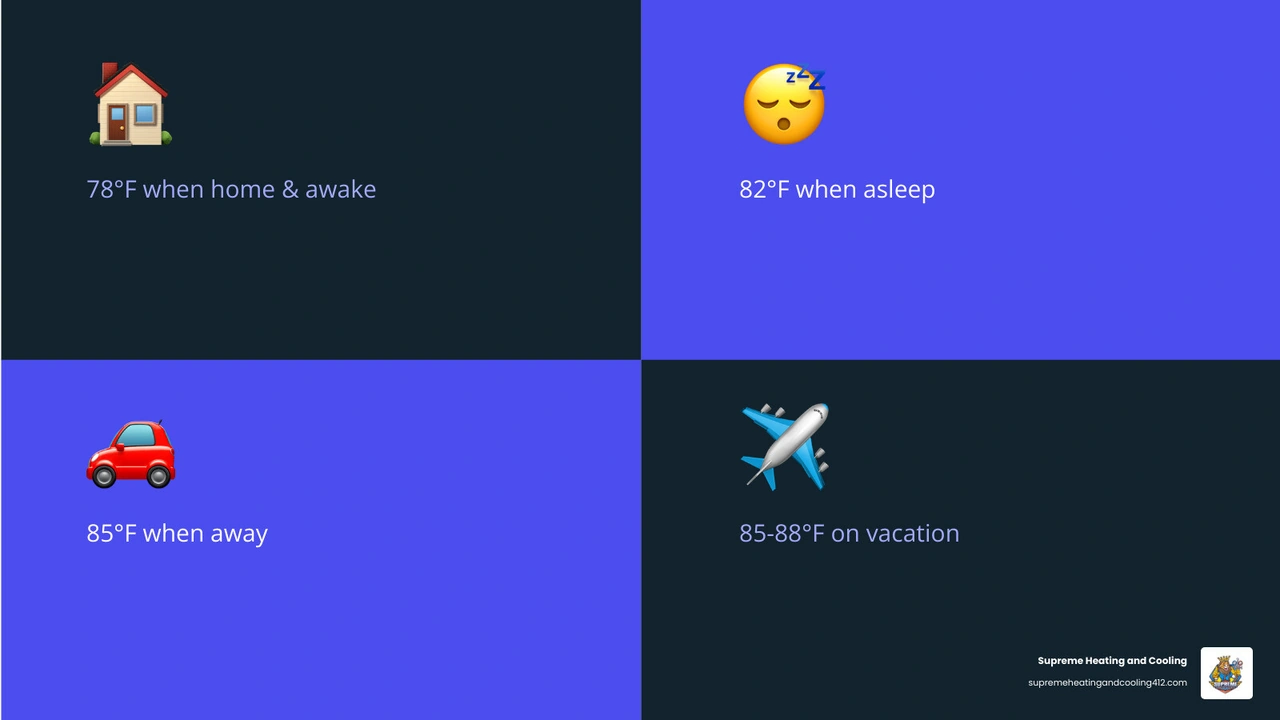
• Home and awake — Recommended Setting: 78°F
• Asleep — Recommended Setting: 82°F
• Away from home — Recommended Setting: 85°F
• Extended vacation — Recommended Setting: 85–88°F (not above 90°F)
Every degree you raise above 72°F saves roughly 3% on your cooling bill. Moving from 72°F to 78°F alone can cut your cooling costs by around 18%.
Summer in Pennsylvania hits hard. When the heat and humidity climb across Pittsburgh, Monroeville, Bethel Park, and the surrounding areas, your AC runs longer, your system works harder, and your energy bill quietly balloons. Heating and cooling account for nearly half of a home's total energy use during peak summer months — and for many homeowners, that bill feels impossible to control.
The good news? You do not need a new AC system to start saving. Most of the biggest wins come from something as simple as knowing what temperature to set your thermostat — and when. This guide breaks down exactly what works, what does not, and what the research actually says about staying comfortable without overpaying.
Best Thermostat Settings for Summer AC Savings at Home, Away, and Overnight
Finding the right balance between a cool home and a manageable bill is the ultimate summer goal. While many of us grew up in households where 72°F was the "standard," modern energy research suggests that we can be just as comfortable at higher temperatures if we manage our homes correctly. The Department of Energy (DOE) suggests 78°F as the baseline for efficiency, but we know that every family in Fox Chapel or Bethel Park has different needs.
Best thermostat settings for summer AC savings when you are home and awake
When you are active around the house, 78°F is widely considered the "sweet spot." At this temperature, your air conditioner can effectively remove humidity without having to run 24/7.
If 78°F sounds a bit warm at first, we recommend a "stair-step" approach. Try raising your thermostat by one degree every few days. This allows your body to acclimate to the change. You might find that with the right humidity balance, 78°F feels perfectly pleasant, especially if you are dressed for the season in light, breathable clothing.
Best thermostat settings for summer AC savings when you are away or asleep
The biggest mistake we see homeowners make is leaving the AC at the same temperature all day long. You can save up to 10% a year on your cooling costs just by turning the thermostat up 7–10 degrees for eight hours a day.
• While Away: If you are heading to work in Pittsburgh or spending the day out in Monroeville, set the thermostat to 85°F.
• While Sleeping: The DOE suggests 82°F for sleep, though many people prefer it slightly cooler. Even a small bump to 76°F or 78°F at night can result in noticeable savings.
• Vacation: If you’re leaving for a week, 85°F is ideal. This keeps the house from becoming a sauna while ensuring your refrigerator and other appliances don't overheat.
• Home/Awake — Ideal Temperature: 78°F — Savings Potential: Baseline Efficiency
• Asleep — Ideal Temperature: 82°F — Savings Potential: High Savings
• Away (8+ hours) — Ideal Temperature: 85°F — Savings Potential: Up to 10% Yearly
• Vacation — Ideal Temperature: 85°F - 88°F — Savings Potential: Maximum Protection
Is 78°F too warm or the sweet spot for savings?
For some, 78°F feels like a heatwave; for others, it’s perfect. Comfort is subjective and heavily influenced by "feels-like" factors. If your home has high-quality insulation and low humidity, 78°F will feel much cooler than it would in a drafty, damp environment. If you have sensitive sleepers or young children in the house, you may need to adjust these numbers down by a few degrees, but remember: every degree closer to 72°F adds roughly 3% to your monthly bill.
How Much Energy You Save by Raising the Thermostat
Understanding the "why" behind these numbers can help you stay motivated when you're tempted to crank the AC down to 68°F. Your air conditioner is the largest energy consumer in your home, sometimes representing up to 27% of total residential energy use in hotter months.
What happens when you raise the thermostat by 1 degree
It sounds small, but a single degree makes a massive difference in runtime. When you raise the setting, you reduce the "load" on your system. This means the compressor doesn't have to work as hard or as long to reach the target temperature. In our experience serving areas like Penn Hills and Greensburg, homeowners who consistently keep their homes at 75°F instead of 72°F see a 9% reduction in their cooling costs almost immediately.
Why lowering the thermostat does not cool your home faster
This is one of the most persistent myths in the HVAC world. Your air conditioner does not work like a garden hose; it doesn't "spray" colder air if you turn the dial lower. Most systems cool at a fixed rate. If your home is 80°F and you want it to be 72°F, setting the thermostat to 60°F won't get you there any faster. It just ensures the system will keep running long after you’ve reached your comfort zone, wasting energy and putting unnecessary strain on the equipment.
Should you turn the AC off completely when leaving the house?
We generally advise against turning the AC off entirely during a Pennsylvania summer. If you turn it off, the temperature and humidity inside your home will skyrocket. When you return, your AC will have to work for hours at maximum capacity to remove all that trapped heat from your walls, furniture, and flooring.
Instead, use the "setback" strategy. By raising the temperature to 85°F when you leave, you keep the humidity under control and protect your electronics and appliances without forcing the system to start from scratch when you get home.
Fans, Humidity, and Fan Mode: The Comfort Tricks That Let You Set It Higher
If you want to stick to the best thermostat settings for summer AC savings, you need to use the tools already available in your home.
How ceiling fans help you feel cooler without lowering the thermostat
A ceiling fan is your best friend in July. While fans don't actually lower the temperature of a room, they create a "wind chill effect" on your skin by evaporating moisture. Using a ceiling fan can make a room feel up to four degrees cooler. This means a room at 78°F with a fan running feels like 74°F to your body.
Pro Tip: Ensure your fan blades are spinning counterclockwise in the summer to push air straight down. Also, fans cool people, not rooms—turn them off when you leave the space to save even more.
Why humidity changes what temperature feels comfortable
In the Pittsburgh area, it’s rarely just the heat—it’s the humidity. When the air is thick with moisture, your sweat can’t evaporate, which is how your body naturally cools itself. This is why 78°F at 40% humidity feels great, while 78°F at 70% humidity feels like a swamp. Keeping your indoor humidity between 40% and 60% is key. If your home feels muggy even at 78°F, a whole-home dehumidifier might be a better investment than simply lowering the thermostat.
Auto vs On: which thermostat fan setting saves more energy?
On your thermostat, you’ll see a "Fan" setting with two options: Auto and On.
• Auto: The fan only runs when the AC is actively cooling. This is the most energy-efficient setting and helps with dehumidification because it allows moisture on the cooling coils to drip into the drain pan.
• On: The fan runs constantly, even when the AC isn't cooling. While this can help circulate air, it uses significantly more electricity and can actually blow moisture back into your home before it has a chance to drain away.
Always stick to "Auto" for maximum savings.
The 20-Degree Rule and Other Summer Thermostat Mistakes to Avoid
Your air conditioner has physical limits. Understanding these can prevent you from calling for a repair when the system is actually doing its best.
What the 20-degree rule means for AC performance on hot days
Most air conditioning systems are designed to drop the indoor temperature by about 20 degrees compared to the outdoor air. If it is a blistering 98°F day in New Kensington, your AC will likely struggle to get the house below 78°F. Forcing a system to try and hit 70°F on a 98°F day can lead to a 300% increase in system wear and tear. On extreme days, be kind to your AC and set the thermostat a little higher.
Common summer thermostat mistakes that waste energy
• Frequent Adjustments: "Thermostat jiggling" (constantly moving the temp up and down) prevents the system from reaching an efficient rhythm.
• Cooling an Empty House: If no one is home in Wilkinsburg or Swissvale, there is no reason to keep the house at 72°F.
• Ignoring Maintenance: A dirty air filter restricts airflow and can increase your energy bill by up to 15%.
• Blocked Vents: Ensure furniture and curtains aren't blocking the supply or return vents.
Why thermostat location can skew your settings
If your thermostat is placed in a sunny hallway or near a heat-generating appliance like an oven, it will get a "false" reading. It might think the whole house is 85°F when it's actually 75°F, causing the AC to run unnecessarily. For more on this, check out our Ac Thermostat Placement Guide.
Optimizing your thermostat is only half the battle. You can help your AC work less by making small changes to your environment.
Small home changes that support better thermostat settings
• Close the Blinds: Up to 30% of unwanted heat comes from your windows. Closing curtains and blinds—especially on south and west-facing windows—can keep your home significantly cooler.
• Mind Your Appliances: Stoves, ovens, and dryers can raise indoor temperatures by up to 10 degrees. Try to cook outdoors or use the microwave during the hottest parts of the day.
• Seal the Leaks: Use weatherstripping to prevent cool air from escaping around doors and windows.
Maintenance tips that help your AC hit the right temperature efficiently
We cannot stress this enough: a well-maintained AC is an efficient AC.
1. Change Filters Monthly: In the peak of summer, check your filter every 30 days.
2. Clear the Outdoor Unit: Ensure there is at least 2–3 feet of clearance around your outdoor condenser. Trim back bushes and remove debris.
3. Clean the Coils: Dirty coils can't release heat effectively, forcing the system to run longer.
For more professional insights, you can read about the Best Thermostat For Energy Efficiency to see which models handle these tasks best.
Why smart and programmable thermostats improve summer savings
If you find it hard to remember to change the settings before you leave for work in Oakmont, a smart thermostat is a game-changer. These devices allow you to set schedules or even use "geofencing" to automatically raise the temperature when you leave a certain radius of your home.
Whether you want a Wi Fi Thermostat Connection for remote control or a full Smart Thermostat Installation, these tools take the guesswork out of savings. You can Upgrade Home Smart Thermostats to modern models that actually "learn" your schedule and adjust themselves for peak efficiency.
Frequently Asked Questions about Best Thermostat Settings for Summer AC Savings
What thermostat setting is best for extended vacations or very hot days?
For long vacations, set your thermostat to 85°F. This is high enough to save money but low enough to protect your home’s woodwork, electronics, and any indoor plants. If you have pets staying at the house, you should keep the setting closer to 78–80°F depending on the breed.
Can a bad thermostat or wiring problem cause summer comfort issues?
Absolutely. If your thermostat is old or has loose connections, it may fail to signal the AC to turn on, or it might cause "short cycling," where the system turns on and off rapidly. If you suspect a technical glitch, read our guide on Ac Thermostat Wiring Problems or consider a Home Comfort Advanced Thermostat to ensure your readings are accurate.
Do heat pumps need different summer thermostat strategies?
Heat pumps are incredibly efficient, but they work best when you "set it and forget it." While you can still use setbacks, you should avoid drastic temperature swings (more than 5 degrees) as this can sometimes trigger less efficient backup modes. Learn more at Optimizing Home Efficiency Unveiling Heat Pump Thermostat Strategies.
Conclusion
At Supreme Heating and Cooling, we want to help you stay cool without the stress of a massive utility bill. By aiming for that 78°F mark, using fans strategically, and keeping up with basic maintenance, you can significantly reduce your energy consumption this summer.
Whether you are in Pittsburgh, Monroeville, or Bethel Park, our team is here to ensure your system is running at its absolute best. If your thermostat is acting up or your bills are still high despite your best efforts, it might be time for a professional tune-up or a smart upgrade.
Other Blogs
Promotions
Take advantage of our latest promotions to save on chimney, dryer vent, and air duct cleaning—making it easier to protect your home and improve air quality at a great value.
10% off for veterans, law enforcement, and first responders


Customer Testimonials
Our customers love the noticeable difference in air quality, the professionalism of our team, and the peace of mind that comes with every thorough cleaning.


Copyright © 2025 Superior Vents. All rights reserved.
Designed & Developed by
