

Adjusting Your Smart Thermostat Schedule for the Back-to-School Transition
Cooling an empty house wastes energy once the kids return to the classroom. Reprogram your daytime AC settings to maximize efficiency without sacrificing afternoon comfort.
The Challenge of the August Back-to-School Transition
August in Pennsylvania brings a sudden and unmistakable shift to your household routine, which makes adjusting your smart thermostat schedule for the back-to-school transition a top priority for local homeowners. One week, the house is full of summer chaos, with doors opening and closing constantly and family members occupying every room. The next week, the heavy front door clicks shut at 7:30 AM, and the house sits completely empty until the school bus drops the kids off mid-afternoon. This abrupt change in occupancy creates a unique challenge for managing your indoor comfort and energy usage.
For many families, this transition introduces a daily dilemma. At Supreme Heating and Cooling, we regularly hear from local parents who want to save energy while the kids are sitting in a classroom, but absolutely do not want them returning to a sweltering, uncomfortable home after a long, hot bus ride. Balancing this equation manually is frustrating and often leads to wasted energy or a house that feels like an oven at 3:00 PM. Fortunately, modern smart thermostats offer automated solutions that take the guesswork entirely out of this seasonal shift. When properly configured, these devices manage the climate of your home seamlessly, prioritizing family-centric comfort without requiring you to constantly tap a screen or dial.
Whether you need comprehensive HVAC services to prepare your system for the changing seasons or just need guidance on optimizing your current setup, understanding how to program your home's climate controls is the first step toward a more comfortable fall.
The Hidden Danger of Turning Your AC Off During the School Day
A common misconception among homeowners is that the best way to save energy when the house is empty is to turn the air conditioning completely off. While this might seem logical on the surface, a complete system shutdown actually creates hidden dangers for your cooling equipment and can ultimately cost you more in the long run. When you turn the system off at 8:00 AM, the indoor temperature steadily climbs throughout the day. By the time you turn it back on at 3:00 PM, the system has to overcome a massive heat load.
The problem is that your air conditioner doesn't just have to cool the air inside the rooms. It has to remove the heat that has baked into your furniture, carpets, drywall, and cabinetry. This forces the compressor to run continuously at maximum capacity during the hottest part of the afternoon, causing extreme wear and tear. Just last August, our team at Supreme Heating and Cooling responded to an emergency call on a scorching day when a local family's AC stopped working entirely after struggling to keep up with intense afternoon heat. Our technician arrived, identified the problem quickly, and had the AC running again within 30 minutes. While we were glad to provide a fast fix, we often see these sudden breakdowns trace back to the intense system strain caused by extreme temperature swings.
Instead of a complete shutdown, implementing a moderate 75-78°F daytime setback is the most efficient approach to empty-house cooling. This allows the system to cycle on occasionally, preventing the house from turning into a heat sink. If your current device doesn't allow for easy daily scheduling, looking into a professional smart thermostat installation can automate this protective setback.
• Turning AC Completely Off — Impact on Equipment: High strain; forces continuous running during peak afternoon heat to recover. — Afternoon Comfort Level: Poor; house feels hot and stuffy for hours after the system is turned back on.
• Moderate 75-78°F Setback — Impact on Equipment: Low strain; system cycles gently to maintain a reasonable baseline temperature. — Afternoon Comfort Level: Excellent; system easily drops the temperature a few degrees before arrival.
Building the Perfect 4-Step Weekday Thermostat Schedule
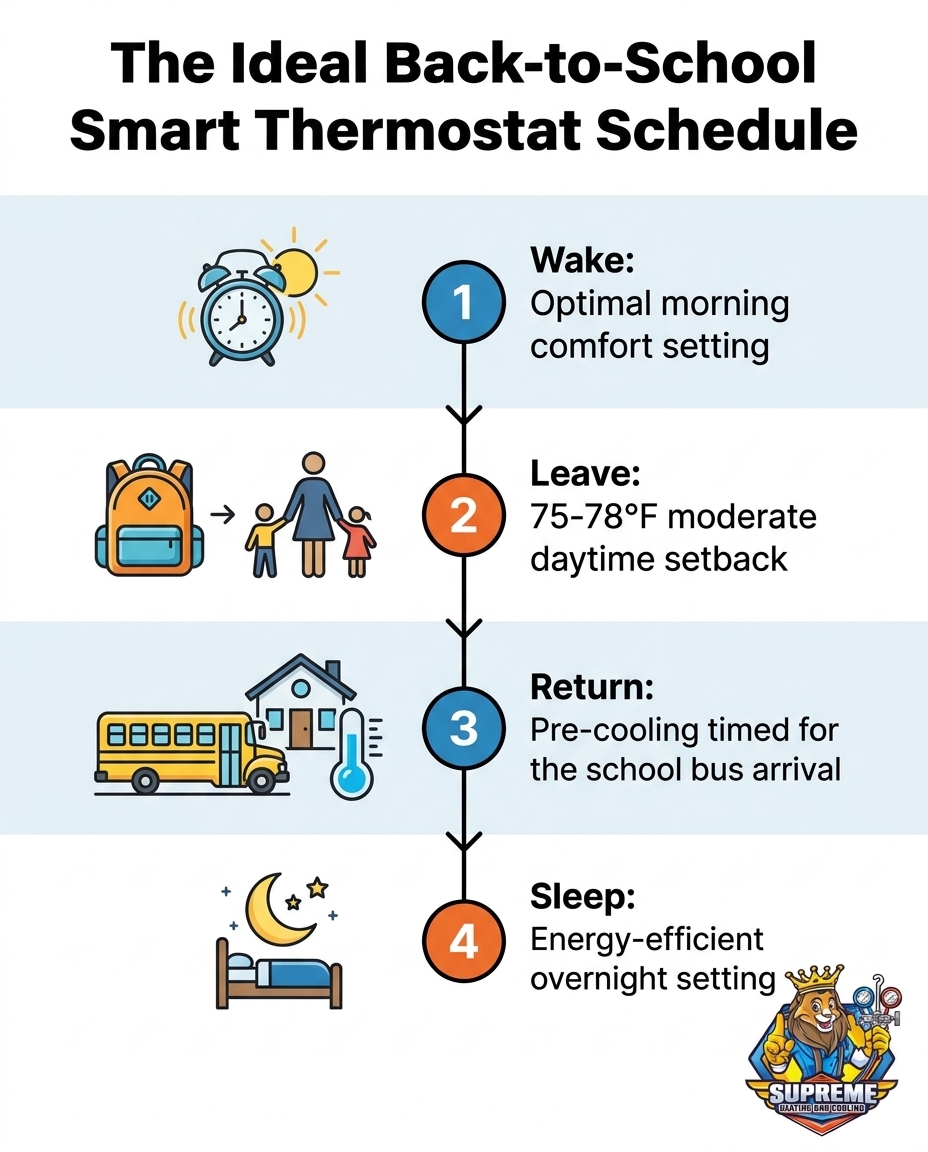
To maximize both comfort and efficiency during the school year, your smart thermostat needs a structured daily routine. A highly effective weekday schedule generally follows four distinct phases. By programming these steps into your device, you ensure the house responds to your family's actual presence rather than running blindly all day long.
• Morning/Wake (6:00 AM - 8:00 AM): Set the thermostat to your family's ideal comfort temperature (typically around 70-72°F). This ensures everyone is comfortable while eating breakfast, packing lunches, and getting dressed for the day. A cool, comfortable morning reduces the stress of the early rush.
• Leave for School/Away (8:00 AM - 2:30 PM): Implement a 75-78°F daytime setback. This is the crucial energy-saving window. The house is empty, so there is no need to keep it perfectly chilled, but this moderate temperature prevents the home's structure from absorbing excessive heat.
• Return Home (2:30 PM - 9:00 PM): Trigger the recovery cooling phase. Program the thermostat to return to your preferred evening temperature (e.g., 72°F) about 30 to 45 minutes before the school bus arrives. This ensures the house is welcoming and cool the moment the front door opens.
• Sleep (9:00 PM - 6:00 AM): Adjust for overnight efficiency. Many families prefer a slightly cooler setting for sleeping (around 68-70°F). Because outdoor temperatures drop at night, your system won't have to work as hard to maintain this cooler baseline.
Setting up this 4-step routine takes only a few minutes on most smartphone companion apps, but it provides months of automated, worry-free comfort.
Timing the Afternoon Recovery Cooling for the School Bus
One of the most common scheduling mistakes homeowners make during the August back-to-school transition is leaving their thermostat programmed for a standard 5:00 PM work return. While this works perfectly during the summer when kids might be at day camps or daycare, it leaves children walking into a warm, stuffy house at 3:00 PM when the school bus drops them off.
Modern smart thermostats feature a technology often called "Smart Recovery" or "Early Start." This feature actively learns how long it takes your specific HVAC system to cool your specific home by one degree. Instead of guessing when to turn the AC back on, you simply tell the thermostat what time you want the house to reach the target temperature.
1. Determine the exact arrival time: Note when the kids actually walk through the front door.
2. Set the target temperature: Input your desired comfort level (e.g., 72°F) for that specific time.
3. Let the algorithm work: The thermostat will monitor the indoor temperature and automatically start the cooling cycle early enough to hit the target right as the bus pulls up.
This gradual cooling approach is incredibly beneficial. Walking into a pre-cooled home after a hot late-summer bus ride instantly improves everyone's mood. Furthermore, gradual cooling prevents the system from suddenly kicking into high gear and running at maximum capacity during the absolute hottest part of the day, which reduces energy spikes and minimizes wear on your compressor.
Leveraging Geofencing for Unpredictable After-School Activities
While a rigid Monday-through-Friday schedule is a great foundation, the reality of family life is rarely perfectly predictable. The August back-to-school transition often brings a chaotic mix of early dismissals, unexpected sick days, and last-minute sports practices. This is where the advanced features of a smart thermostat truly shine, particularly geofencing.
Geofencing uses the location services on your smartphone to create an invisible geographic boundary around your home—usually a radius of a few miles. When your phone crosses this boundary, it sends a signal to your thermostat. If you leave work early to pick up a sick child from school, crossing that invisible fence will automatically override your "Away" schedule and trigger the HVAC system to start cooling the house immediately. You don't have to remember to open an app and change the temperature manually while navigating the school pickup line.
Additionally, smart thermostats offer features like screen locking. If you have teenagers who arrive home before you do and are prone to drastically dropping the temperature to 65°F the moment they walk in, a PIN lock ensures the system stays within the efficient parameters you've set. By utilizing these automation and control features, busy parents can significantly reduce their mental load, knowing the home's climate is managing itself intelligently.
Combating Late-Summer Humidity and Temperature Swings
When programming your system for the new school year, it is vital to account for the specific climate context of the Pittsburgh and broader Pennsylvania region. In our years of providing HVAC services across the area, we've seen firsthand how our hot, intensely humid late-summer afternoons give way to increasingly cooler nights. This dynamic means that controlling humidity is just as important as controlling the temperature.
Air conditioners do more than just cool the air; they also dehumidify it. As warm indoor air passes over the cold evaporator coil, moisture condenses and drains away. If you turn your system completely off during the day, not only does the temperature rise, but the indoor humidity skyrockets. A house sitting at 78°F with 60% humidity feels clammy, sticky, and deeply uncomfortable.
By maintaining a 75-78°F daytime setback, you ensure the air conditioner runs just enough to strip that excess moisture out of the air. When the system drops the temperature back down for the kids arriving home, the air is already dry, making the home feel instantly cooler and more refreshing. Furthermore, as we move deeper into September, automated schedules prevent the system from overcooling the house at night when outdoor temperatures begin to drop significantly, keeping your family comfortable without wasting energy.
Ensuring Your System is Ready for the Autumn Shift
Adjusting your daily schedules and utilizing smart features will only yield results if the physical HVAC equipment is running efficiently. As the cooling season winds down and the heating season approaches, the August back-to-school transition is the perfect reminder to evaluate your system's overall health. A thermostat can only request cooling or heating; it cannot force a struggling system to perform better.
Proactive care before the cold weather sets in is essential. Recently, our Supreme Heating and Cooling team visited a homeowner who wanted to ensure their older furnace was in safe, working condition before winter arrived. Our technician performed a thorough check, answered their questions, and even showed them how replacing a specific, failing pump would improve efficiency and lower utility costs. By the end of the visit, the customer had received clear advice, cost-saving tips, and the peace of mind that their system was ready for the seasonal shift. Scheduling routine HVAC maintenance ensures your equipment can actually deliver the temperatures your smart schedule demands.
When to Consider a Device Upgrade
If you are still using a basic, manual thermostat or an older programmable model with a tiny, confusing screen, you might be missing out on the benefits of modern scheduling. Signs that your current device is no longer meeting your family's needs include constantly having to override the schedule manually, a lack of smartphone connectivity, or an inability to set different schedules for different days of the week. In these cases, upgrading to a modern smart thermostat provides long-term comfort benefits, giving you the tools to manage the chaotic school year with ease.
Frequently Asked Questions
What temperature should I set my thermostat when the house is empty for school?
A moderate setback of 75 to 78 degrees is ideal when the house is empty during the day. This temperature prevents the home from absorbing too much heat while significantly reducing the amount of energy your system uses. It strikes the perfect balance between efficiency and an easy afternoon recovery.
Does turning the AC off completely during the day save money?
Turning the AC off entirely rarely saves money because it forces the system to overwork during the afternoon recovery period. The extreme heat buildup requires the compressor to run continuously at maximum capacity, which draws a massive amount of power and puts heavy wear on the equipment. A moderate setback is far more efficient.
How long does it take for a house to cool down after a daytime setback?
Most standard HVAC systems can cool a home by about one degree every 15 to 20 minutes, depending on the insulation and outdoor temperatures. If you implement a 4-degree setback, you should expect it to take roughly an hour for the house to return to your preferred comfort level. Smart thermostats learn this timing automatically.
How do I program a smart thermostat for early fall temperature swings?
Use the "Auto" mode on your smart thermostat to handle early fall temperature swings seamlessly. This mode allows you to set both a cooling threshold and a heating threshold (e.g., cool at 74°F, heat at 68°F). The system will automatically switch between the AC and the furnace as the unpredictable weather demands.
Can geofencing replace a traditional weekday thermostat schedule?
Geofencing is best used as a backup to a traditional schedule rather than a complete replacement. A set schedule ensures the house begins pre-cooling before you even leave work, whereas relying solely on geofencing might not give the system enough time to cool the house if your commute is short. Together, they provide the ultimate comfort and flexibility.
What is the best way to manage indoor humidity while the family is away?
The best way to manage indoor humidity is to allow the air conditioner to cycle on occasionally throughout the day. By using a moderate daytime setback rather than turning the system off, the AC continues to pull moisture from the air. This prevents the house from feeling sticky and clammy when everyone returns home.
Managing your home's climate doesn't have to be another chore on your busy back-to-school list. By taking a few minutes to optimize your smart thermostat schedule, you can ensure your family returns to a perfectly comfortable home every afternoon. If you need help configuring your device or want to ensure your system is ready for the seasonal shift, reach out to schedule your tune-up before the autumn weather fully takes over.
Other Blogs
Promotions
Take advantage of our latest promotions to save on chimney, dryer vent, and air duct cleaning—making it easier to protect your home and improve air quality at a great value.
10% off for veterans, law enforcement, and first responders


Customer Testimonials
Our customers love the noticeable difference in air quality, the professionalism of our team, and the peace of mind that comes with every thorough cleaning.


Copyright © 2025 Superior Vents. All rights reserved.
Designed & Developed by
